Getting Started Guide
Setup
Prerequisites
To deploy brapi2arc, you need docker installed at least with version 24.0.6 (minor versions might work, but were not tested).
Personal Access Token
Before you can start using brapi2arc, you need to set up authentication with your GitLab instance:
- Log in to your DataHUB instance (where your ARC is stored).
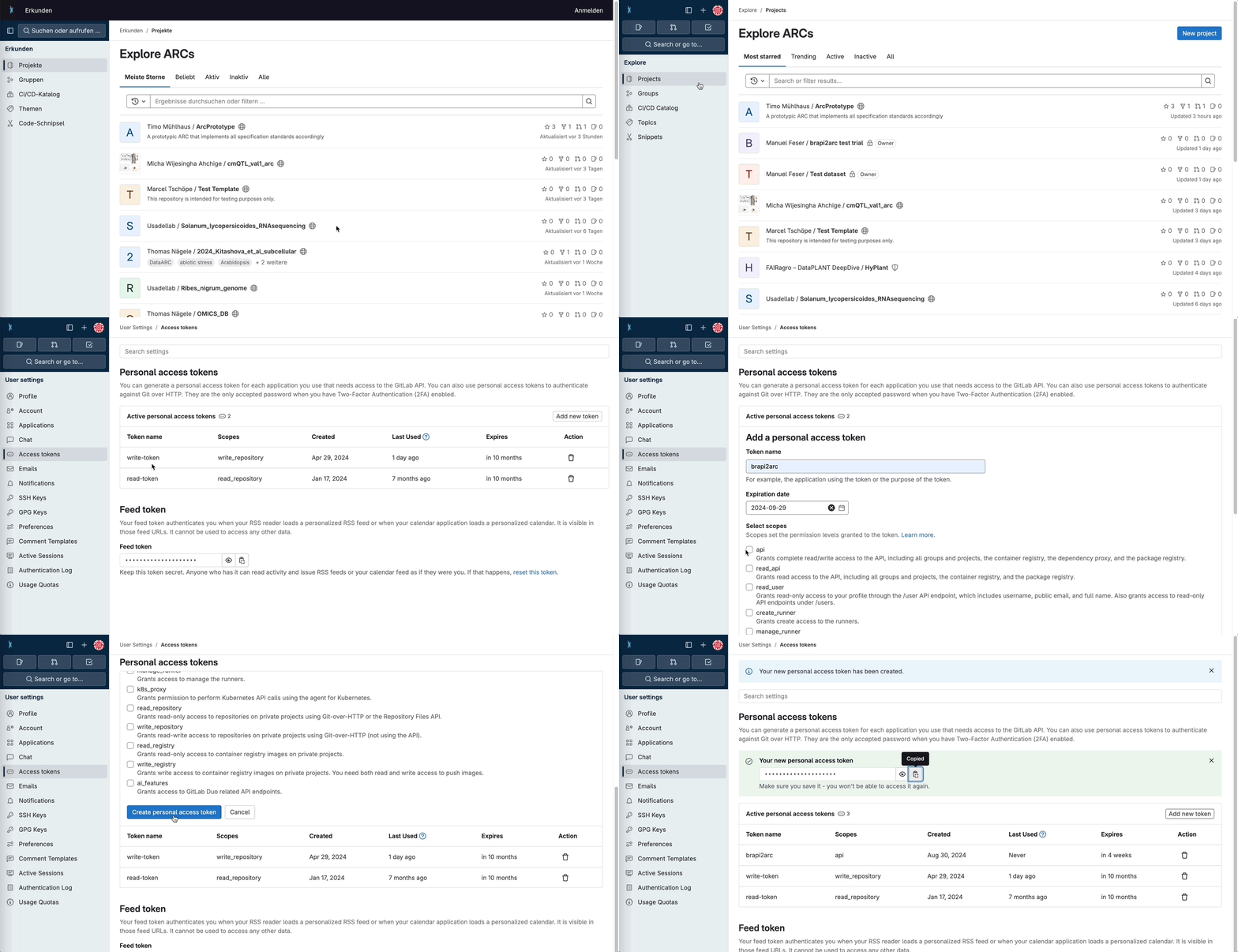
- Generate a Personal Access Token:
- Go to Edit Profile > Access Tokens
- Click on "Add new token"
- Give your token a descriptive name
- Select an appropriate expiration date
- Select the necessary scopes (at least
api) - Click "Create personal access token"
- Store the generated token securely. You'll need it later to authenticate the tool.
Installation
To install the tool, follow these steps:
-
Clone the repository:
-
Set your environment variable. The brapi2arc tool depends on the
ARC_URIset as an environment variable as well as the personal access token created in the step before. For this create a file.env. -
Build and run the container using Docker:
The tool will now be running on http://localhost:8080. You can access it via a web browser or use it programmatically.
Usage
Now that you have the tool installed and authenticated, you can start using it. For detailed information on the BrAPI endpoints, you can visit http://localhost:8080 (or http://localhost:8080/schema) to see the OpenAPI specification. You can also use this to test if everything is working as expected with your ARC.
Retrieving data
The brapi2arc tool provides access through BrAPI endpoints to the metadata available in your ARC that are required to add observation scoring results. Available endpoints are:
POST /search/germplasmPOST /search/variablesGET /programsGET /trialsGET /studiesGET /studytypesGET /observationunitsGET /germplasmGET /variables
Writing data
To write data to the ARC, you can use the POST /observations endpoint. Using the endpoints above, you need to make sure that the entities like observation units and observation variables exist.
Troubleshooting
If you encounter any issues:
- Check that the Docker container is running correctly.
- Verify that your Personal Access Token has the necessary permissions.
- Ensure that your GitLab instance URL and repository name are correct.
- Review the logs for any error messages:
By following these steps, you should be able to successfully install, set up, and start using the tool to interact with your ARC. Remember to refer to the full API documentation for more detailed information on endpoints and request/response formats.